The setup
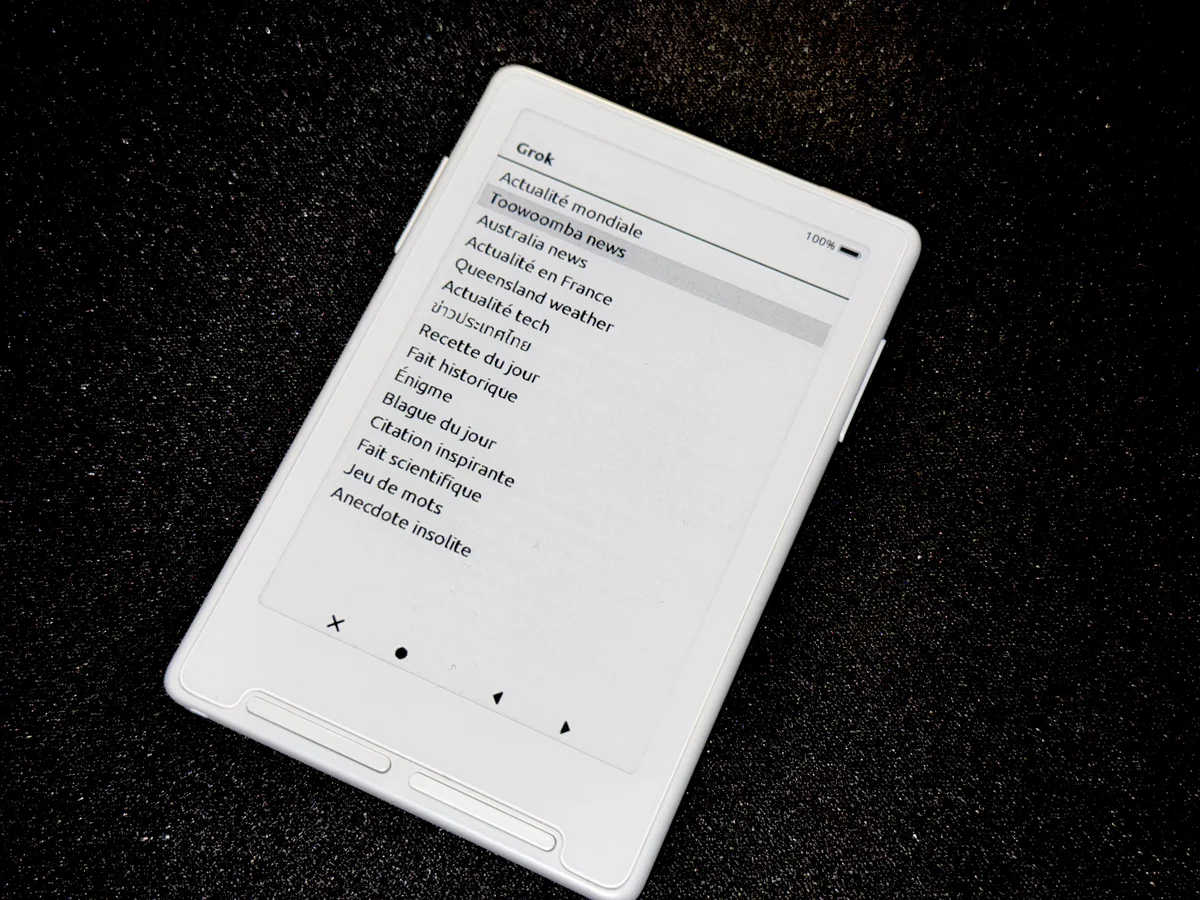
The Xteink X4 is a cheap e-ink reader running open-source firmware on an ESP32-C3: a single-core RISC-V chip with roughly 380 KB of RAM, no PSRAM, and a single 48 KB framebuffer. The display is 800×480, monochrome, with a 1–2 second full refresh. Input is six physical buttons. There is no keyboard.
I wanted it to query Grok (xAI's LLM) and render the answers — news digests, recipes, riddles, trivia — on the e-ink screen, in French, English, and Thai.
This turned out to be two hard problems wearing one feature's clothes:
- A systems problem: every "obvious" way to do the network call crashed, and the real enemy was always contiguous memory.
- A UX problem: how do you drive a conversational AI when the user can't type?
- The
listrequest (fetch the topic menu) returned its first byte in 2 seconds. - The
askrequest (the actual question) sat silent for 11 seconds while the relay waited on xAI. - The device generates a random
jobIdand sends it to the relay. - The relay replies instantly with
STATUS:PENDING, then starts the slow xAI call in the background and returns. - The device re-polls once per second until a poll returns the finished answer instead of
PENDING. - built request URLs by chaining
std::stringconcatenations (several temporary blocks), and - loaded the entire response into RAM, then made a second full copy during Markdown parsing.
- URLs built with
snprintfinto a stack buffer — zero heap allocation. - HTTP buffers shrunk from 4 KB to 512 bytes for Grok (the 4 KB buffer literally couldn't be allocated).
- The network read buffer sized down to match.
- The response streams to the SD card in 512-byte chunks as it arrives.
- Parsing reads that file line by line, writing cleaned text into a second SD file. Only a tiny index of byte offsets (
mdParas, a few hundred bytes) lives in RAM. - At draw time, each paragraph is read back from SD on demand (seek + read).
- On exit, the temp files are deleted.
- Zero text entry — the user picks from a list with Left/Right and confirms.
- Prompt engineering stays server-side — I can tune the prompts (force web search, set the article count, forbid citation brackets, fix the output language) without reflashing the device.
- The label and the prompt are decoupled — the screen shows "Australia news," the model receives a precise English instruction to search Australian sources.
- The Grok logo blinks (black/grey) — its phase toggles on every poll, so motion = the loop is alive.
- Under it: the current step in plain English —
Asking Grok..., thenWriting answer...once the response starts landing on SD. - Under that: a live counter —
Waiting response attempt 12— so a long wait reads as progress, not a hang. - Headings are measured in bold. The wrapper originally measured a heading in the regular font, decided it fit on one line, then drew it in the wider bold weight — so long titles ran off the screen edge instead of wrapping. Passing the real style to the measure pass fixed it.
- No artificial line cap. A stray
maxLines = 6was silently truncating the last sentence of every article with an ellipsis. The wrap budget had to be effectively unlimited.
This article covers both.
Part I — The systems problem: contiguous memory is the only memory that counts
Problem 1: The device can't speak HTTPS
The first wall was immediate. You cannot open a TLS connection to api.x.ai from this chip. The mbedTLS handshake needs a large contiguous heap block — its allocations cumulatively consume ~48 KB — but once the Wi-Fi stack is up, the largest free block on the ESP32-C3 collapses to about 6 KB. Every attempt died with ESP_ERR_HTTP_CONNECT.
The fix: a PHP relay. I host a small script (xteink.php) on my own server that holds the xAI API key and makes the HTTPS call itself. The device only ever does plain http:// GETs — no TLS, no handshake, no contiguous-memory crisis. The relay does the secure part; the device just reads text.
This pattern — push anything memory-hungry off the device — became the theme of the whole project.
Problem 2: "It works locally but not on the real server"
The relay worked perfectly on my laptop on the LAN. Hosted on my actual web host, the device showed "no connection." I first blamed DNS, then redirects, then the network. All wrong.
I stopped guessing and measured — a curl with full timing breakdown told the truth instantly:
During those 11 seconds of total silence, the device's TCP keep-alive reaped the socket before a single byte arrived. The list survived because it was fast; the ask didn't because it wasn't.
The fix: an asynchronous polling architecture.
The connection is never silent for more than a second. Backgrounding the PHP work requires litespeed_finish_request() — my host runs LiteSpeed, not PHP-FPM, which I discovered by adding a ?action=diag endpoint to probe the runtime instead of assuming.
Problem 3: The silent crash on arrival
Communication finally worked — and then the device rebooted without warning the moment a real answer came back. No serial console, so I dumped a crash report to the SD card and decoded the PC with addr2line:
abort() ← std::bad_alloc ← std::string operator+ / parseMarkdown reserve()
The firmware is built with -fno-exceptions. That one flag changes everything: an unhandled C++ exception isn't unwound — it calls abort() directly. The code was throwing bad_alloc because it:
On a heap whose largest block is ~640 bytes, two contiguous copies of a 4 KB response is instant death. Thai made it worse: 3-byte-per-character UTF-8 roughly doubles the size of every answer.
Fixes, stacked:
Problem 4: The leak that killed the second request
Then the most maddening symptom: the first question worked, but a second one failed — only a restart fixed it.
I logged the heap delta after every download. The pattern jumped out: a ~460-byte leak per request. After 20 polls, 9 KB gone — not enough to open another connection.
The culprit was TCP keep-alive. Because the firmware recreates the HTTP client on every poll, keep-alive couldn't reuse anything — it just held a socket and its buffers hostage between requests. Disabling it dropped the per-request leak from −460 to about −50 bytes. The heap finally stayed flat.
A cousin bug: after leaving Grok, the home screen icons went blank — the activity left the heap too fragmented for the launcher to reload its bitmaps. Fix: release everything on exit (the Grok icon, the answer index, the decompressed glyph cache).
Problem 5: The structural fix — the SD card is overflow RAM
Even with every patch above, large answers — a 6 KB article — still hit "Answer too large." Rendering text requires one contiguous RAM block, and on a fragmented heap that block doesn't exist.
The decisive idea was to stop fighting the heap: never hold the full answer in RAM at all.
No allocation ever needs a block bigger than a single paragraph. A 10 KB answer now renders comfortably on a heap fragmented down to 4 KB. This one change retroactively dissolved a whole class of crashes.
Problem 6: Making the news actually real
Grok was inventing the news instead of looking it up. xAI's old search_parameters field now returns HTTP 410 — "Live search is deprecated."
I migrated the relay to the Agent Tools API (/v1/responses with tools: [{type: web_search}]), then verified — by inspecting the raw API response — that Grok was issuing real web searches and citing real sources (Thai outlets like thairath.co.th and matichon.co.th for Thai topics). The relay strips the inline [1] citation markers, which the e-ink renderer can't display.
Part II — The UX problem: a conversation with no keyboard
A chat UI assumes a keyboard. This device has six buttons and a 1–2 second screen refresh. So the central UX question wasn't "how do we render a chat bubble" — it was "how does the user ask anything at all?"
Replace free text with a curated menu
The answer was to delete the text-input problem entirely. Instead of letting the user type a prompt, the relay defines ~15 predefined topics — world news, local news, weather, tech, a recipe, a historical fact, a riddle, a joke, an inspiring quote, and so on. Each topic maps server-side to a full, carefully written prompt.
The device only ever sees a short label; the long prompt lives on the server. This has three payoffs:
This is the keyboardless-LLM lesson in one line: when you can't take arbitrary input, pre-curate a small set of excellent intents. It's less flexible than a chat box, and on a dedicated reading device that's exactly right — it's an appliance, not a terminal.
Make the wait legible
An LLM call with web search takes 20–40 seconds. On a slow e-ink panel with no spinner animation, that's an eternity where the user can't tell if the device is working or frozen. Worse, the polling architecture means the device is genuinely idle between one-second polls.
So the loading screen is built to prove liveness:
There's an honest design choice hiding here. I prototyped a percentage progress bar, then removed it: the number of polls isn't knowable in advance (it depends on xAI's latency), so a percentage would be a lie. An incrementing attempt counter is honest — it says "still working, here's how long" without faking precision. The device also gives up after ~90 polls with a clear "took too long, try again," rather than polling forever.
Render Markdown that survives a monochrome panel
The model returns Markdown, but an e-ink reader can't do everything a browser does. So the relay's system prompts constrain the output to what the device renders well: ### headings, short paragraphs, real bullet lists only when needed — no tables, no bold, no emojis, no links. The device-side parser then maps each line to a style (heading, body, bullet, numbered, rule) and lays it out with proper wrapping.
Two device-side details mattered more than expected:
Multilingual on a constrained font set
Thai isn't Latin — different glyphs, taller line height, 3-byte UTF-8. The renderer detects Thai codepoints per-paragraph and switches to the Thai font with the correct line spacing, while the relay forces the answer language per topic (Thai news in Thai, Australian news in English). The home-screen header even falls back to a generic "Grok" title when the topic label is Thai, because the themed header font is Latin-only — small compromises so the right script always shows.
Reading ergonomics
Scrolling is two buttons: Right advances down the answer, Left goes back up — and crucially, the device refuses to scroll past the end (no scrolling into blank space), because on a slow-refreshing panel an unnecessary full repaint into emptiness feels broken. Back returns to the topic list and frees the answer, ready for the next pick.
The lesson
On the ESP32-C3, free-RAM totals lie. What matters is the largest contiguous block. Almost every systems bug here — the crash, the "no connection," the "answer too large," the dead second request, the missing home icons — was the same failure in disguise: a contiguous allocation too big for a heap that Wi-Fi had already shattered. The cure was to treat the SD card as overflow memory and keep only tiny indices in RAM, while the PHP relay absorbed everything the device couldn't do: TLS, web search, and the long wait.
And on the UX side, the keyboardless constraint forced a better product than a chat box would have been. When the user can't type, you don't build a worse keyboard — you curate intent, make the wait honest, and shape the model's output to your medium. The result isn't a chatbot bolted onto a reader. It's an appliance that happens to be powered by an LLM, which is exactly what a dedicated e-reader should be.
Hardware: Xteink X4 (ESP32-C3, 380 KB RAM, 6 buttons, 800×480 e-ink). Firmware: open-source CrossPoint reader. Relay: PHP + xAI Agent Tools API.