1. Context: a UX designer on the factory floor

Right now, I'm working in a food manufacturing plant in Australia. Not out of industrial vocation — but to validate my 88 regional work days, a requirement of the Working Holiday visa to stay a second year in the country.

This is my first real manual job after years in tech — UX design, interfaces, digital products. And honestly, it's one of the most enriching professional experiences I've had. Not for the reasons you'd expect.

When you walk into an industrial environment with a designer's eye, you can't help but observe. How operators work. Where they lose time. Where they make mistakes — not out of carelessness, but because the tools aren't adapted to the reality of the floor.

And as an operator myself, directly confronted with these friction points, I decided to solve one of them.

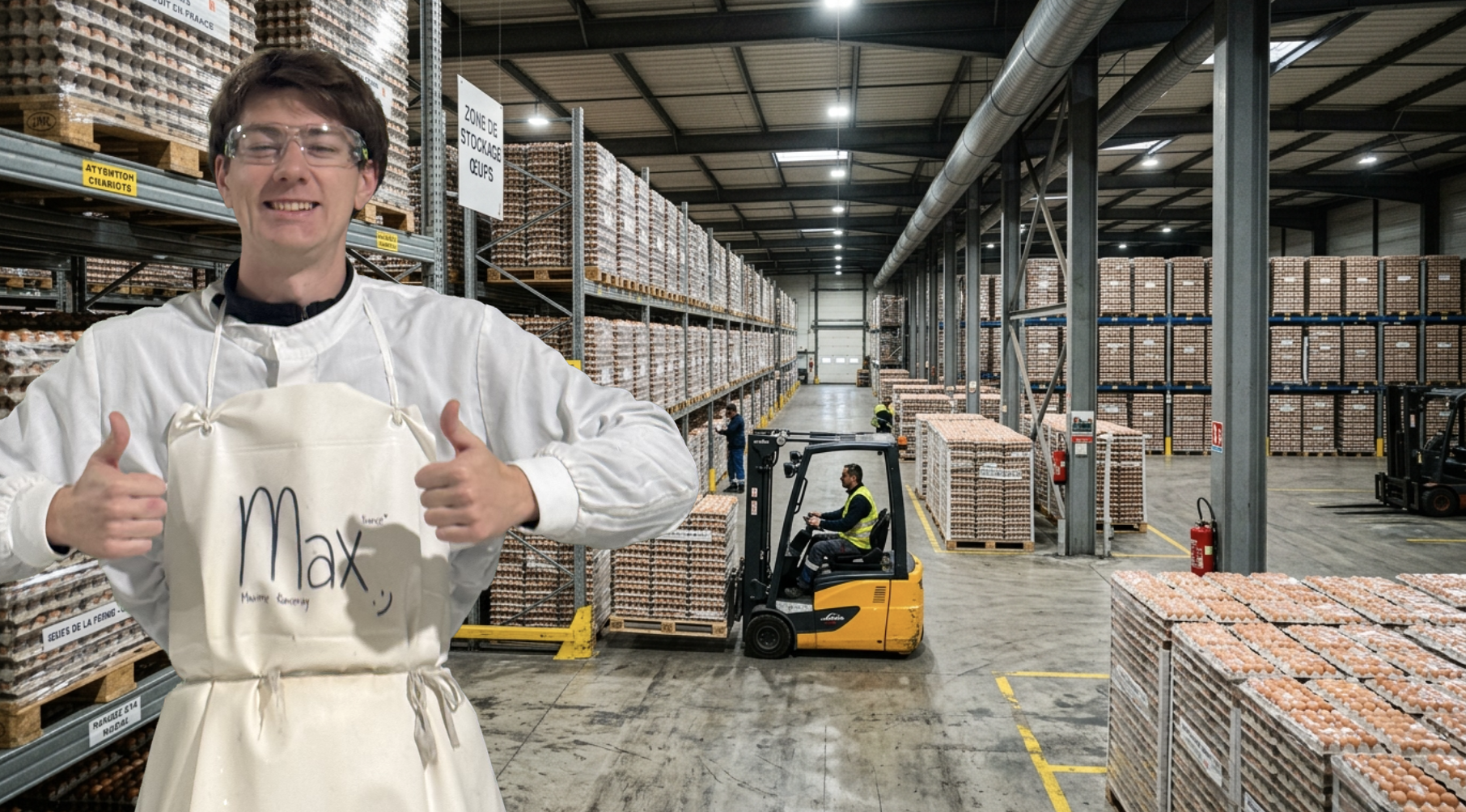
Me on the factory floor

What I'm going to walk you through is how I identified a real operational problem, designed a solution, and built it end-to-end in one week — with AI as the central engine.


2. The factory: understanding the context

The plant I work in produces pasteurised liquid egg. The end product goes to industrial bakeries, pasta manufacturers, and large-scale food industries.

From raw egg pallets to cracking machine to pasteurised liquid egg

The operation runs as a continuous production chain. Raw eggs arrive by truck from partner farms. They're cracked and processed on production lines. Finished products are packaged and shipped. Every step has its quality, traceability, and throughput constraints.

And it all starts with the reception of raw materials — pallets of raw eggs.

I work across several stations in the plant. But goods receiving is by far the trickiest — and the one that immediately caught my attention.


3. Anatomy of a goods reception

A truck pulls up to the dock. Inside: between 6 and 20 pallets of eggs depending on the delivery.

The truck has a cost for every minute it sits idle. The objective is simple: unload it as fast as possible. Except it's not just physical unloading.

For every single pallet, we must:

  1. Remove the bracing elements inside the truck
  2. Retrieve the supplier sheet attached to the pallet
  3. Weigh the pallet on the floor scale
  4. Calculate the net weight (gross weight − tare) on a calculator
  5. Read the temperature with a thermometer
  6. Record all information on a paper form
  7. Apply a label based on the egg's characteristics
  8. Store the pallet in the correct zone of the refrigerated warehouse
  9. All of this, as a two-person team, in a continuous chain, without slowing down.

    The duo in action

    To understand why this is hard, you need to visualise how the two roles run in parallel:

    ME (paperwork)PARTNER (forklift)
    Start the reception formOpen the truck
    Remove bracing elementsExtract pallet 1
    Retrieve the pallet sheetMove pallet 1 onto the scale
    Record pallet info + calculate net weightPull pallet 2 out of the truck
    Label + read temperatureRemove pallet 1 from scale
    Record pallet 2 infoStore pallet 1 in warehouse
    Calculate net weight + label + read temperatureMove pallet 2 onto the scale
    Pull pallet 3 out of the truck
    ↻ repeats for every pallet↻ repeats for every pallet

    My partner never stops. As soon as one pallet leaves the scale, the next one arrives. And I need to have finished the paperwork for the previous pallet before the next one is weighed — because the weight shows on the scale display and disappears the moment the pallet is removed.

    That rhythm is what creates the pressure. And that pressure is where the errors happen.

    The data to capture — and why it matters

    The information to record isn't trivial. For each pallet:

    • Lay date — eggs have a limited shelf life. This date is critical for regulatory traceability.
    • Production system — cage, cage-free, or free-range. These three categories have different values and cannot be mixed in production.
    • Egg treatment — washed or unwashed? This detail completely changes how the eggs are used in production and their shelf life.
    • Gross weight — to verify conformity with the supplier's delivery note.
    • Temperature — if eggs exceed 15°C at reception, the cold chain is broken. The batch is potentially non-compliant.

    The fundamental storage rule: never mix quality grades. Free-range with free-range. Washed with washed. A mix can compromise the traceability of an entire batch — and corrupt a production recipe.

    We're dealing with a speed constraint, a precision constraint, and a regulatory traceability constraint. Simultaneously.


    4. The pain points — what actually happens on the floor

    Picture the scene. The forklift is running a continuous loop — truck to scale, scale to cold storage, back to truck. Every time a pallet lands on the scale, you have a few seconds to read the weight before the forklift picks it up again and the display resets.

    And in that window, you need to write down, by hand, on a paper form attached to a clipboard, the weight you just saw, the temperature you read on the thermometer, and the information from the supplier sheet. If you miss something, it's too late — the forklift has already taken the pallet away.

    Here are the problems I observed and experienced first-hand:

    1. Data entry errors under pressure Under time pressure, you transpose digits. You misread a date. You mix up a weight. This isn't negligence — it's human cognition under stress and cognitive overload. No operator is immune.

    2. No redundancy If you write down the wrong temperature, nobody knows. There's no verification mechanism. Data enters the system without being cross-checked against anything. The error goes through.

    3. Illegibility Forms filled out in a rush aren't always readable. A later transcription into a computer system adds a second layer of potential error.

    4. Zero real-time visibility The supervisor has no way of following what's happening at the dock during unloading. If there's a problem — out-of-range temperature, mislabelled pallet — they find out after the fact, once the forms are handed in and manually reviewed.

    5. No proof trail In case of a dispute with a supplier — wrong weight, non-compliant temperature at delivery — there's no photographic evidence. Just a number written on paper.


    5. The turning point

    One evening, after a long reception shift, I was looking at the stack of forms from the day.

    Dates, weights, temperatures, farm codes. All written by hand. All to be re-entered. All potentially containing errors that would never surface.

    That day, it actually happened. In the rush, I hadn't double-checked the label on a pallet — a farm whose label colour was different from the others. I didn't know. I recorded it on the wrong reception list. A free-range pallet ended up logged as cage production. It was only caught later during the manual review.

    And I thought: wouldn't it be simpler to take 4 photos in under 30 seconds, rather than writing by hand and risking letting an error slip through unnoticed?

    That's where Paperwork was born.


    6. The solution: Paperwork

    The concept

    The principle is simple: instead of writing information on paper, the operator takes photos. The AI extracts the information. The supervisor sees everything in real time.

    Less friction for the operator. More reliable data. More visibility for management.

    Three non-negotiable design principles

    When designing this project, I set three constraints I wasn't willing to compromise on:

    1. Don't slow the operator down The tool must integrate into the existing workflow, not interrupt it. Taking a photo is faster than writing. That's the only additional gesture required.

    2. Work offline In a refrigerated warehouse, network connectivity isn't guaranteed. The app saves locally and syncs automatically as soon as a connection is available. The operator never waits.

    3. Give visibility without creating extra workload The supervisor can check receptions in real time from their desk — without interrupting operators, without waiting until end of day. The information surfaces itself.

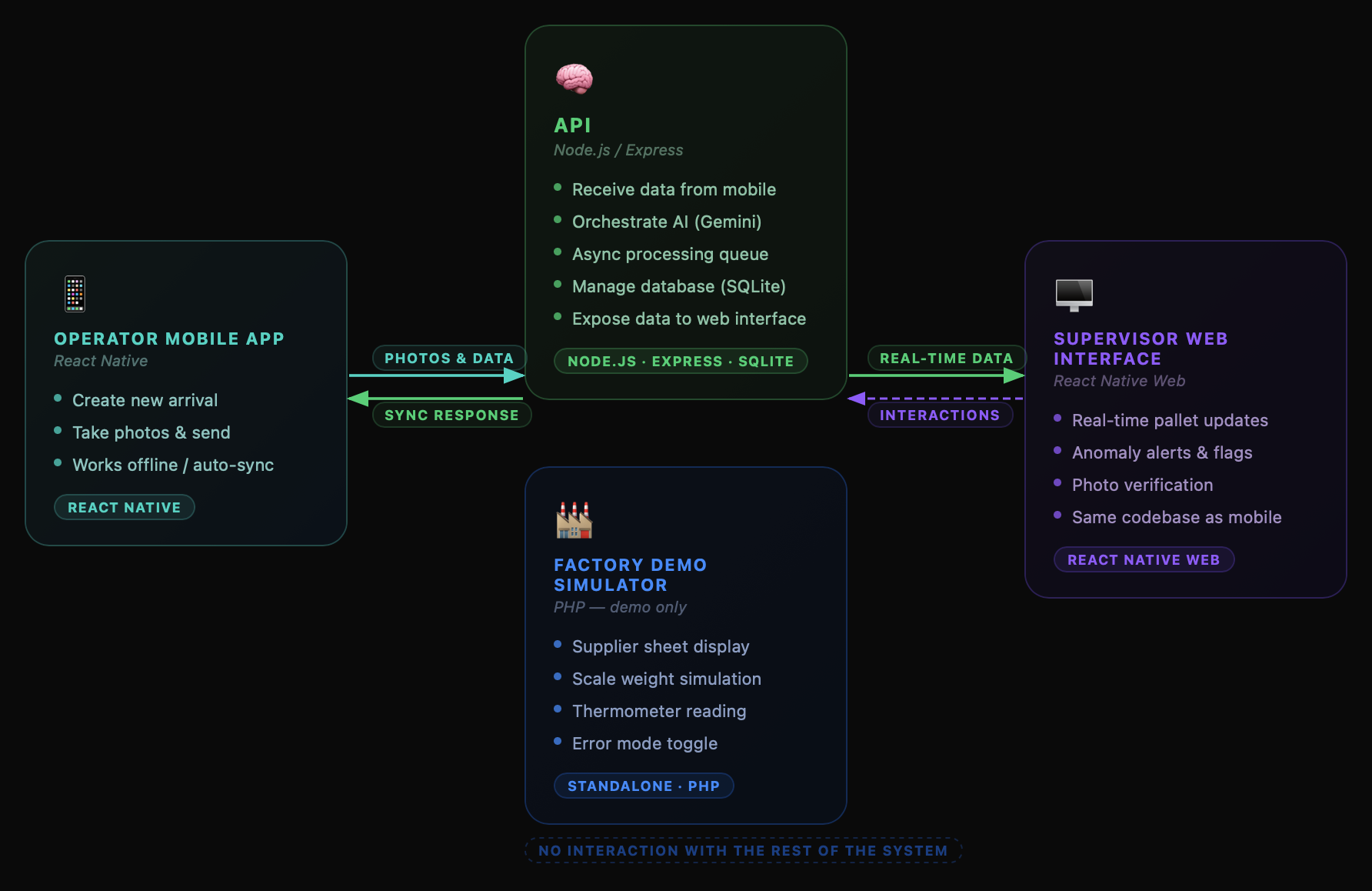
    System architecture

    The system is made of four components:

    Mobile app (React Native) — the operator's tool. They create a new arrival, take photos, and send them. Works offline, syncs in the background.

    Web interface (React Native Web) — same codebase, supervisor view. Updates in real time as pallets come in.

    API (Node.js / Express) — receives data from the mobile app, orchestrates AI processing, manages the database, and exposes data to the web interface.

    Factory simulator (PHP) — built specifically for the demo. Reproduces a pallet arrival: supplier sheet, scale weight, thermometer reading. You can try it here

    System architecture diagram

    The role of AI

    The AI engine is Gemini 2.5 Flash by Google. It steps in twice for each pallet:

    Call 1 — Extraction from the supplier sheet From the photo of the sheet attached to the pallet, Gemini automatically extracts: farm name, pallet ID, lay date, declared gross weight, production system, egg treatment. It also normalises date formats for database consistency.

    Call 2 — Cross-verification The server assembles a composite image: photo of the scale + thermometer + label applied to the pallet. Gemini extracts the numeric values and compares them to the information on the supplier sheet. Any discrepancy is flagged.

    Key architectural point: all AI processing is fully asynchronous.

    The operator takes their photos and immediately moves to the next pallet. The AI processes in a background queue. The supervisor sees results appearing progressively on the web interface — without the unloading being slowed by a single second.


    7. What it looks like in practice

    Normal flow — one pallet from start to finish

    The operator creates a new arrival in the app. They enter their name and record the truck temperature — if the truck isn't at the right temperature, the problem starts there, not with the pallet. They validate the entry checks: approved supplier, clean and secure truck, no signs of contamination.

    Creating a new arrival — operator name, truck temperature, entry checks

    They then take the photos in order: truck temperature, scale, pallet thermometer, label, supplier sheet.

    Adding a pallet — 4 photos in sequence

    The 4 capture steps: pallet label, scale weight, temperature, pallet stamp

    Six seconds later, on the supervisor's web interface, all the information is there: farm name, pallet ID, normalised lay date, gross weight, production system, treatment. Each validated data point is displayed in green. The source photos are available for manual verification if needed.

    AI extraction in real time — data appears on the supervisor view

    Gemini server response — extraction logged in under 10 seconds

    Meanwhile, the operator is already recording the next pallet.

    Scanning pallets at pace — no slowdown

    You can try it yourself: Test the simulator

    Error mode — detection test

    To validate the system, I built an error mode into the simulator that deliberately alters the displayed data relative to what's on the pallet's supplier sheet — simulating a wrong pallet in the wrong truck, a scale error, or a broken cold chain.

    The operator goes through the normal process. Nothing looks different from their side.

    Scanning a problematic pallet — the operator sees nothing unusual

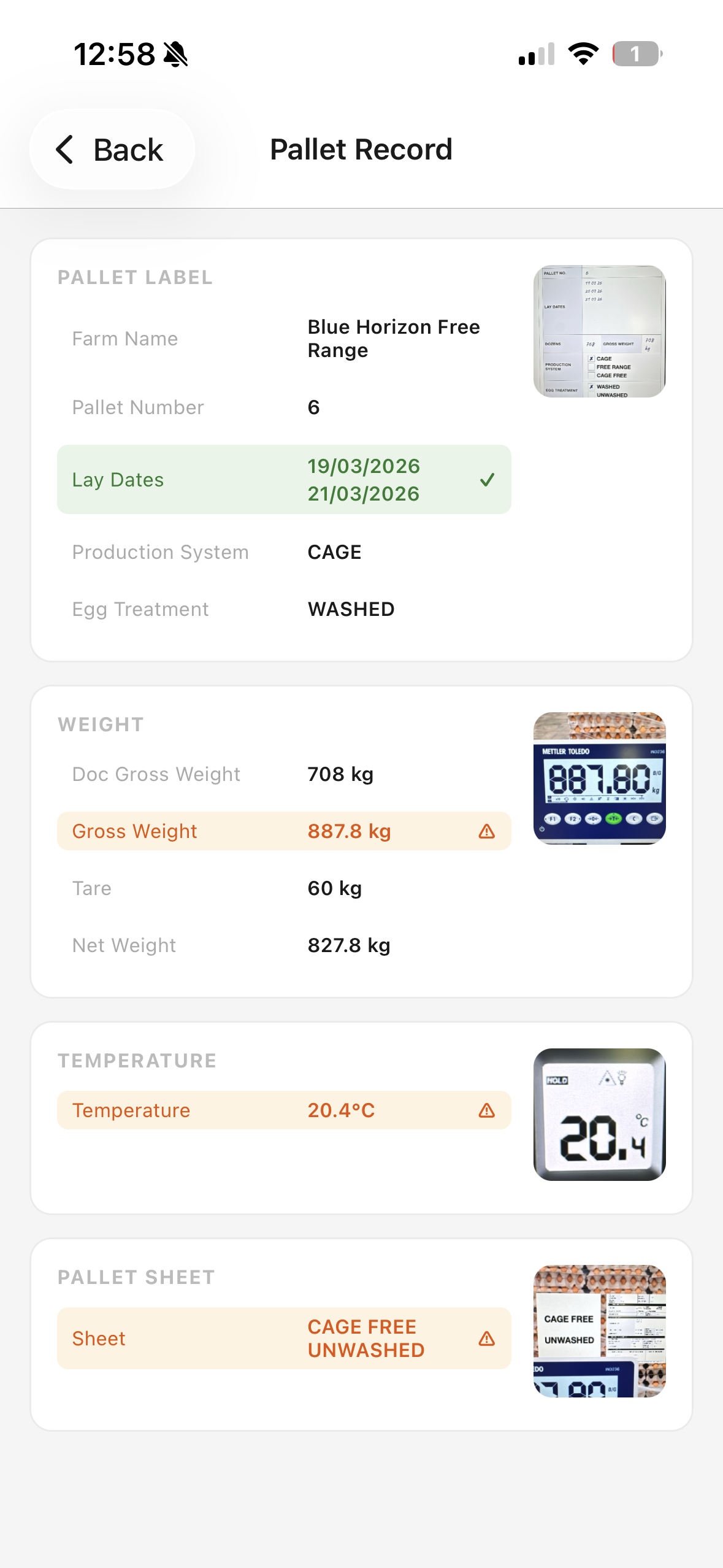
    A few seconds later, an alert appears on the supervisor interface. On the operator's phone, the pallet record shows every anomaly flagged by the AI — weight mismatch, temperature out of range, production system discrepancy.

    Pallet record on the operator app showing AI warnings — weight, temperature and sheet discrepancies flagged in orange Clicking through:

    • Temperature at 20.4°C — compliance threshold exceeded (15°C max). Automatic red flag.
    • Gross weight 887.8 kg vs 708 kg declared — gap of nearly 180 kg. Scale to check, or supplier sheet error — either way, it needs investigating.
    • Label says "Cage / Washed", sheet says "Cage Free / Unwashed" — production system and egg treatment both mismatched. A rushed operator wouldn't have caught it. The AI did.

    Three anomalies. Detected automatically. Without the operator changing anything about their workflow.


    8. The actual cost — and the ROI

    A legitimate question: is this economically viable?

    The system makes 2 Gemini 2.5 Flash API calls per pallet. At current pricing:

    ScaleEstimated AI cost
    1 pallet< $0.0003
    1 reception (12 pallets)< $0.005
    1 month (2 receptions/day)~$0.15

    To put that in perspective: the cost of a single mislabelled, mis-traced, or out-of-temperature batch making it into production can run into thousands of dollars in product recalls or client penalties.

    The ROI isn't debatable.


    9. What I learned — generalisable lessons

    This project is about receiving eggs in an Australian factory. But the principles it demonstrates apply to any industrial environment.

    AI on the factory floor must be invisible to the operator. If the operator has to change their behaviour, learn a new interface, or wait for a result before continuing — the tool will be abandoned. Good industrial design means AI working in the background while the operator does their job.

    The best candidate for automation isn't the most complex task. It's the repetitive, high-pressure task with structured data and a measurable risk of human error. Start small. Measure. Scale.

    Photographic proof changes everything. In an industrial context, moving from handwritten forms to timestamped photographic records is moving from an unverifiable system to complete traceability. That's a level change, not just a comfort upgrade.

    Real-time visibility is a product in itself. Before Paperwork, the supervisor discovered problems at end of day during data entry. With the system, they see alerts in real time during unloading. That information had value — it was just inaccessible.

    Offline-first isn't optional. In warehouses, production zones, industrial environments — counting on network connectivity is counting on something that isn't guaranteed. Any floor-level solution must work without a connection and sync cleanly once it has one.


    10. What's next?

    This prototype was designed and built in one week, with Claude Code handling the speed work on the back-end — API, SQLite database, async queue management.

    It's functional. It solves a real problem. And it demonstrates an approach I can apply to other contexts: identify an operational pain point, design a solution adapted to the reality of the floor, and build it end-to-end.

    I work as a freelancer. If you're in manufacturing or logistics and what you just read resonates — whether it's exactly this problem or another workflow you'd like to automate — I'd genuinely love to talk.

    A custom tool, built for your specific environment, your constraints, your processes: that's exactly what I build.

    Feel free to reach out.