Heavy equipment training has a persistent problem. Sending operators onto real excavators for practice is costly, ties up machines, and carries genuine safety risks. At the same time, traditional e-learning modules—simple slide decks or video lectures—fail to keep attention. Operators click through without retaining the procedural knowledge that prevents accidents.

I decided to test a different approach. As a personal proof-of-concept, I built a browser-based training simulator focused on the pre-operation inspection workflow for an excavator. The goal was to create something that felt close to real without requiring expensive 3D models or native applications.

The solution is a single-page web app that walks the learner through 14 specific checkpoints in a structured pre-op inspection. A virtual instructor named Dave appears on screen, speaks directly to the user via text-to-speech, and guides each step. The experience uses real-time 3D for navigation and spatial immersion, with AI-generated images layered in during static camera phases to push photorealistic detail without adding rendering overhead.

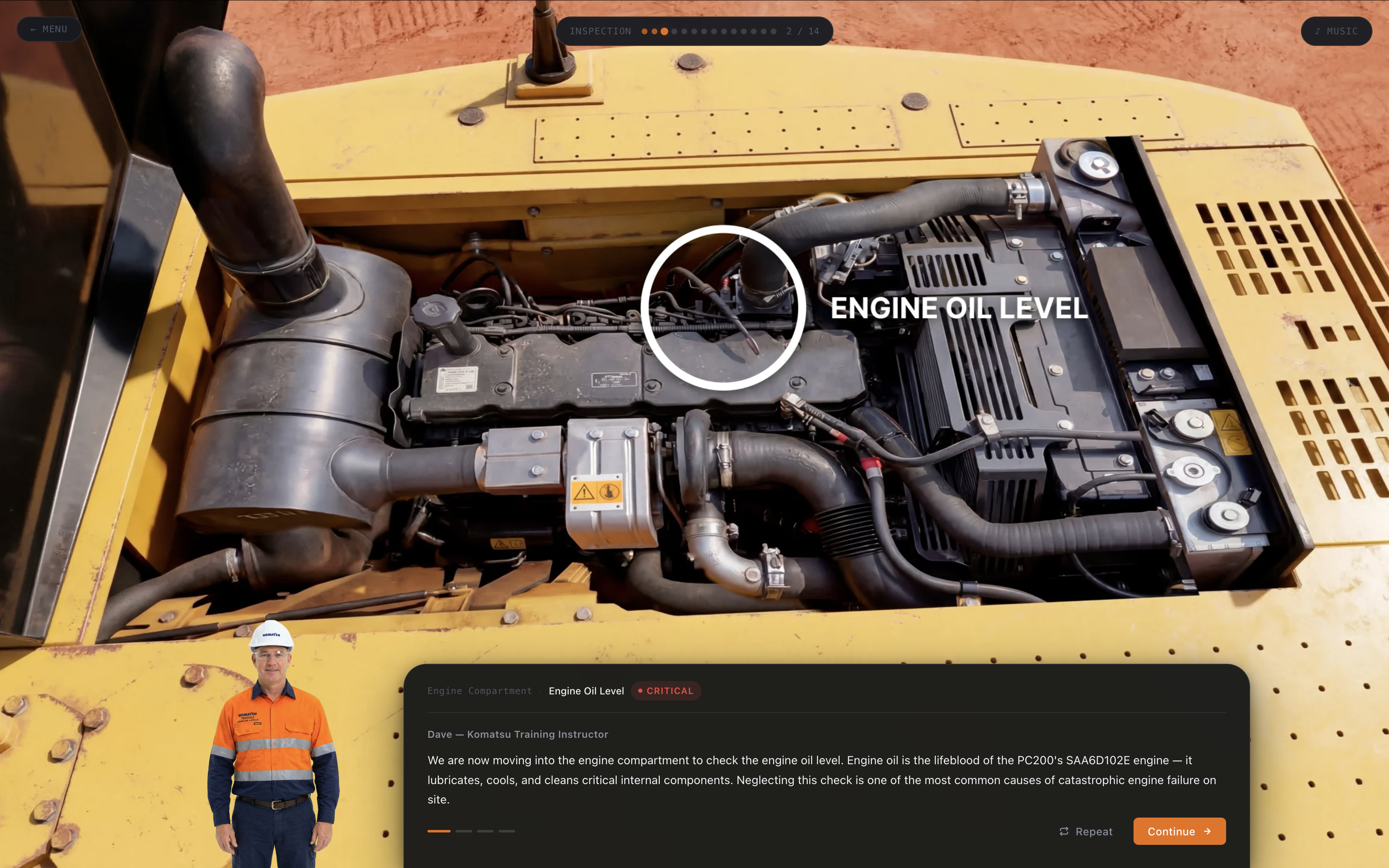
Pre-op inspection scene with AI-enhanced close-up

The image above shows the main training interface. On the left is the primary scene with an AI-enhanced close-up of the engine compartment. Dave stands in the lower right, breadcrumb progress shows the current step, and the narration panel displays the spoken text.

The hybrid approach was a deliberate technical choice. The 3D engine handles movement and spatial orientation, but close-up inspection views benefit from a level of photographic detail that real-time rendering struggles to match without a heavy asset pipeline. AI image generation let me produce highly detailed, realistic views of specific components—hydraulic lines, fluid reservoirs, safety decals—and drop them in during static camera moments. The result is a visually richer experience than pure 3D alone, without multiplying the rendering cost.

The training follows a strict linear workflow that mirrors actual site procedures. Each of the 14 checkpoints focuses on a different area: tracks, undercarriage, hydraulic hoses, engine oil, coolant, handrails, steps, fire extinguisher, and so on. At each station the learner is shown a primary view, then often a detailed close-up. Dave explains what to look for, what constitutes a defect, and why it matters.

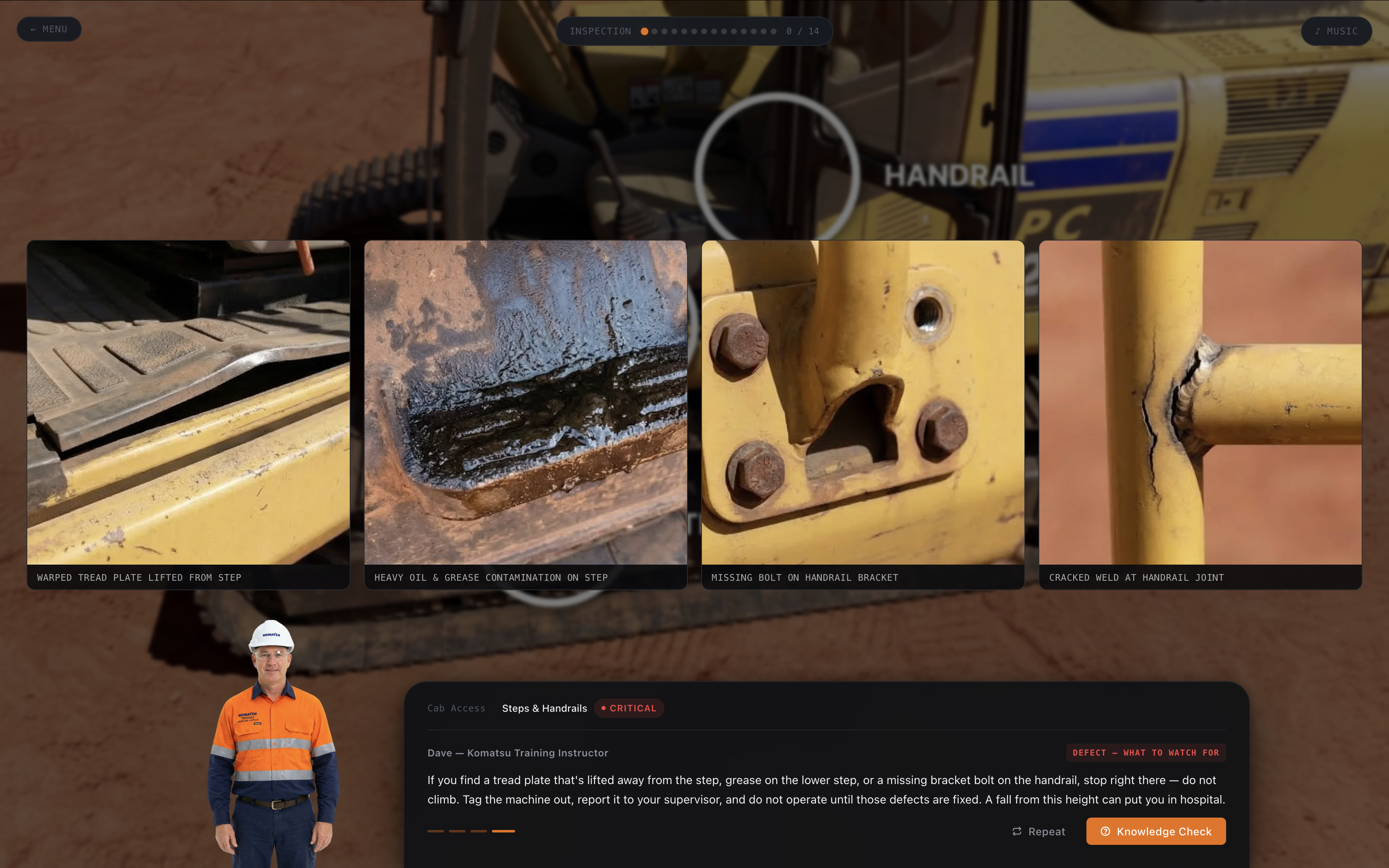
For defect examples I generated multiple variations using AI. This allowed me to show realistic damage without photographing actual broken equipment. The gallery below demonstrates how I presented defective steps and handrails—different types of corrosion, bent metal, missing bolts—so learners can recognize problems in varied conditions.

AI-generated defect examples for steps and handrails

Text-to-speech was critical for engagement. I didn't want learners reading walls of text. Dave's voice reads every instruction, describes each checkpoint, and even delivers the knowledge check questions aloud. The voice is consistent, professional, and slightly authoritative—the kind of tone you'd expect from a seasoned site supervisor. I selected a TTS engine that supported natural pacing and emphasis, which made the narration feel less robotic than older systems.

Knowledge checks appear at four key moments during the flow. These aren't simple multiple-choice traps. Each question presents a realistic scenario the operator might encounter, offers four plausible answers, and provides a detailed explanation of the correct choice immediately after selection. The feedback reinforces why the answer matters from a safety and operational standpoint.

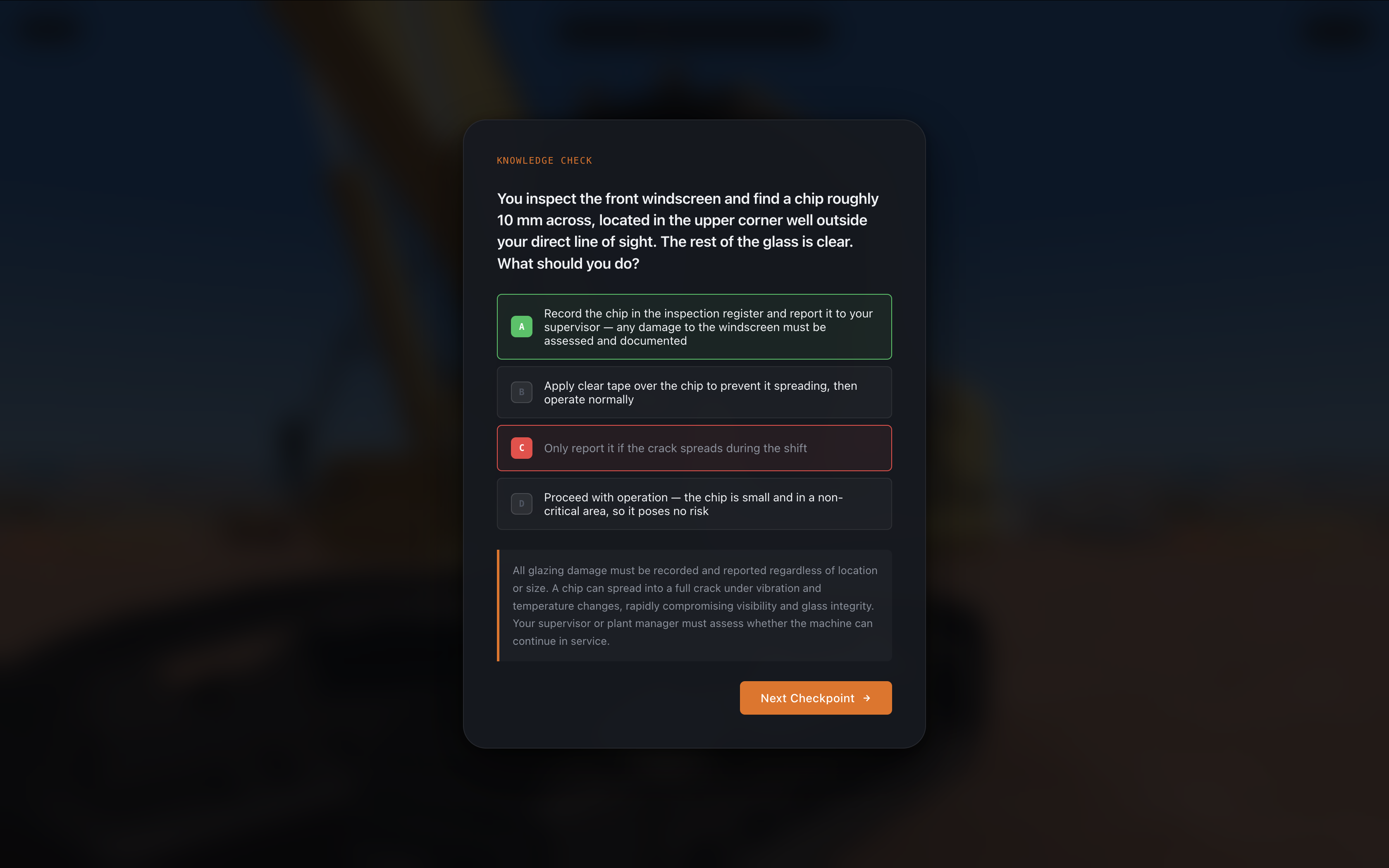
Knowledge check quiz interface with feedback

The quiz screen above shows the question format, Dave's presence, and the immediate feedback panel that appears after answering.

From a technical standpoint the entire experience runs in the browser using vanilla JavaScript, HTML, and CSS with minimal dependencies. Image assets are optimized WebP files served from a static host. State is managed client-side so the application works offline after the initial load. This design choice was intentional: many industrial training environments have limited or unreliable internet access on site.

I limited the scope to one machine type and one procedure to keep the POC focused. The 14-step inspection represents a realistic but manageable slice of the full training curriculum an operator would need. Future versions could expand to other machines, different workflows, or even branch into fault diagnosis and repair procedures.

Three design decisions stand out as principles that apply beyond this specific excavator project.

First, AI-generated imagery can augment 3D when the training goal is visual recognition rather than spatial manipulation. Many industrial procedures are about spotting defects and following checklists. Photorealism matters more than full interactivity in those moments. By injecting generated images into static camera phases I could push detail quality without rebuilding geometry or increasing scene complexity.

Second, a consistent on-screen instructor who speaks raises completion rates. In my testing, users who turned on audio finished the module faster and scored higher on the final knowledge check than those who relied on text alone. The presence of Dave creates a sense of accountability even though it's clearly synthetic.

Third, embedding knowledge checks at the moment of relevance beats end-of-module tests. When a question about hydraulic hose condition appears right after the learner has studied the hose images and heard Dave's explanation, retention improves dramatically. The immediate feedback loop turns the check into a teaching moment rather than an evaluation hurdle.

I built this project as a personal experiment to explore a specific question: how much can you build with almost nothing? The inputs were reference images, publicly available machine documentation, and a browser. No proprietary assets, no game engine licence, no photogrammetry scan of a real excavator. The output is a structured, voiced, interactive training experience that holds up visually and procedurally. That gap between means and result is the point.

The constraints I faced were instructive. Generating enough high-quality images took longer than expected because prompt engineering for technical subjects requires precision. TTS voices still occasionally mispronounce industry terms, requiring careful script writing. And while the web platform offers broad reach, some sites still use older browsers or locked-down devices that limit advanced features.

If your organization needs job-specific training software—whether for heavy equipment, factory machinery, safety procedures, or pre-operational checks—I can build a tailored solution. The combination of AI imagery, guided narration, and structured assessment creates effective learning experiences without the overhead of full 3D simulation or expensive custom development.

The excavator POC demonstrated that you no longer need a large production budget to build convincing industrial training. Reference photos, technical documentation, and the right combination of web tools are enough to produce an experience that engages, informs, and tests. The barrier is not resources — it is knowing how to assemble them.

Industrial training budgets are under pressure. Safety standards are rising. The gap between available training time and required competency continues to widen. Solutions that reduce machine downtime, eliminate risk, and improve knowledge retention deliver measurable business value.

If this type of targeted, engaging, and practical training software could help your operation, contact me. I build exactly these kinds of custom experiences—grounded in real workflows, designed for actual users, and delivered through accessible web technology.